

Reconcile amounts between datasets
Overview
Reconciliation is an optional part of the Join stage. It takes amounts from the Right dataset and allocates them across matching rows in the Left dataset. To allocate means to divide an amount between rows, following rules you choose.
- Right supplies the amounts to allocate.
- Left contains the rows that receive them.
The direction is fixed. If your amounts are in the dataset on the Left, swap the datasets in the Join configuration.
Reconciliation works in two stages:
- Right rows with the same join values are combined into one amount. Combining several values into one, such as adding them up, is called aggregating.
- That amount is allocated across the matching Left rows. Left rows are never combined.
Each Left row keeps its own values. The allocated amount is added in a new column, alongside information carried over from the Right rows.
When to use it
Use Reconciliation when one dataset holds amounts that need to be divided across rows in another. For example:
- payments allocated against invoices
- claim payments allocated across claim lines
- a budget allocated across departments or projects
- capacity allocated across bookings or orders
Any numeric amount can be allocated this way.
Reconciliation also changes how the Join behaves. A normal join produces an output row for every matching Left and Right combination, so three Left rows matching four Right rows give twelve rows. With Reconciliation on, the matching Right rows are combined first, so each matching Left row appears once, instead of once for every matching Right row.
Join points decide which rows belong together
Join points are pairs of columns, one from Left and one from Right, whose values must match. When you select more than one join point, all of them must match. For example:
- Left ‘Client ref’ matches Right ‘Client ref’, and
- Left ‘Allocation ID’ matches Right ‘Allocation ID’.
On this page, an allocation group means the rows that have the same combination of join values. The Right rows in a group are combined into one amount, which is then allocated across the Left rows in the same group. ‘Allocation ID’ is just an example column name. Use whichever columns identify your groups.
Because every join point must match, two clients using the same Allocation ID stay in separate groups when Client ref is also a join point.
Choose the right level of matching
The join points you choose decide how amounts are grouped and where they can go:
- Matching on client and invoice reference keeps each amount with its own invoice.
- Matching on client only, or on a broader pool reference, lets an amount be allocated across several receiving rows.
Quantemplate doesn’t choose the level for you. Pick the join points that match how your amounts should be allocated.
Your datasets don’t need to be grouped or sorted first. Reconciliation groups the Right rows using the join points, and orders the Left rows using the Row Order setting.
Set up Reconciliation
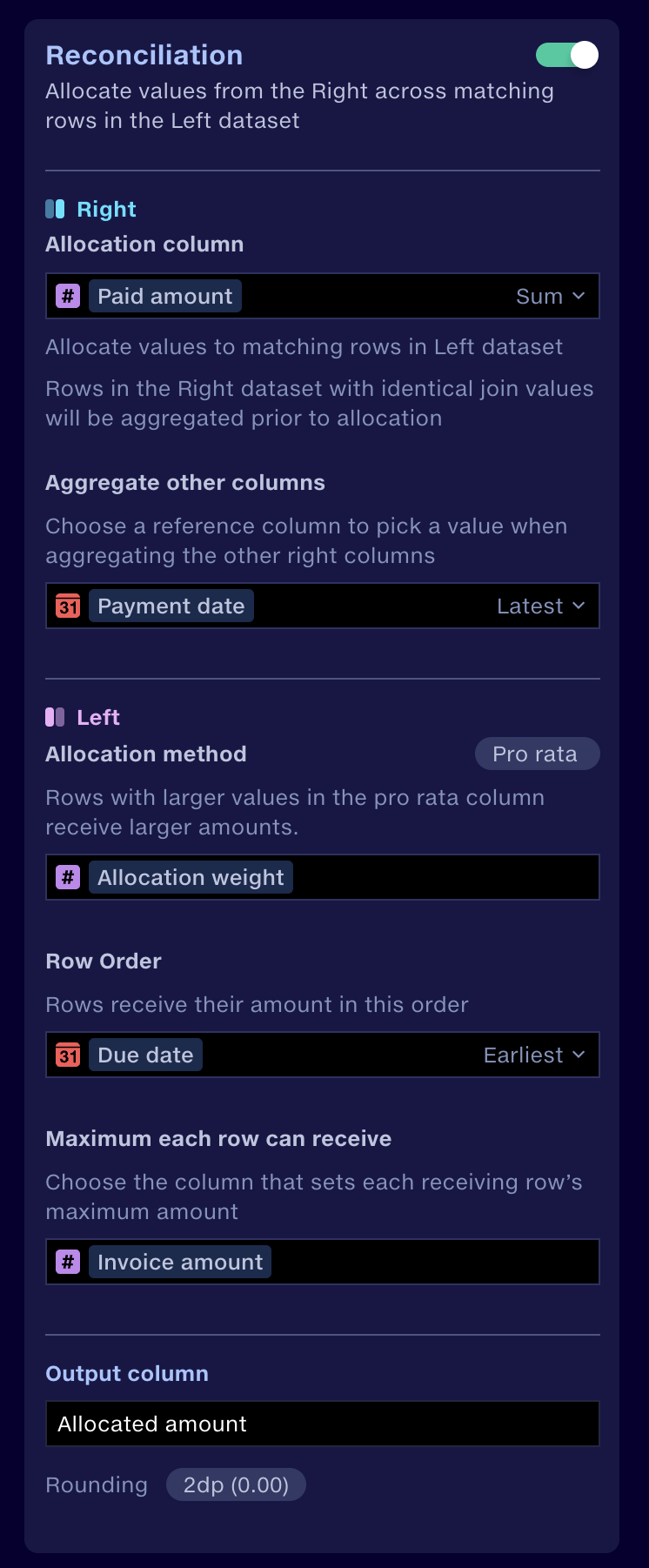
- In the Join stage, put the dataset with the amounts on the Right and the receiving rows on the Left.
- Select the join points that define your allocation groups.
- Turn on the Reconciliation switch. Choosing its settings without turning it on has no effect.
- Under Right, choose the Allocation column and how to combine it, and the reference column for Aggregate other columns.
- Under Left, choose the Allocation method, the Row Order and the Maximum each row can receive.
- Name the Output column and check the Rounding.
- Run the pipeline.
Right dataset settings
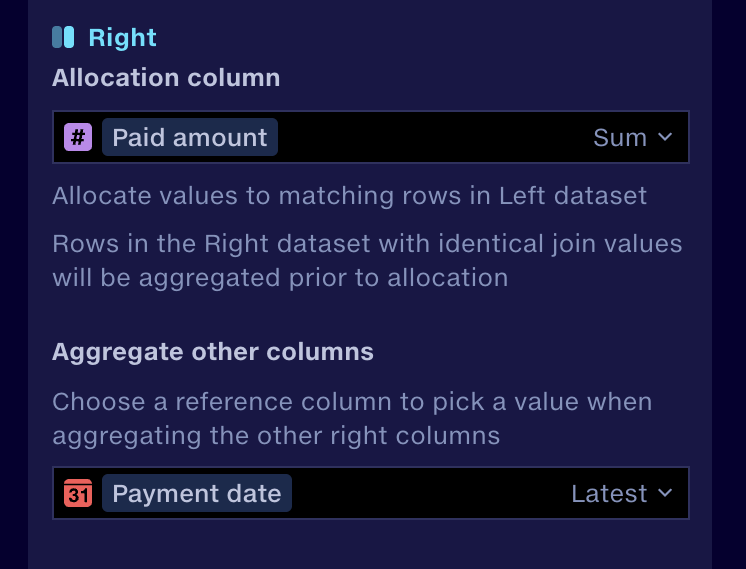
Allocation column
Choose the numeric column in the Right dataset that holds the amounts to allocate, then choose how to combine the amounts in each allocation group:
Option | Amount allocated | Payments of 60, 30 and 30 |
|---|---|---|
Sum | The total of the amounts | 120 |
Mean | The average of the amounts | 40 |
Max | The largest amount | 60 |
Min | The smallest amount | 30 |
Sum is the usual choice for payments. Each Right row counts once, even when two rows have the same amount: two payments of 45 make 90.
Aggregate other columns
The other Right columns, such as a payment ID, date or status, can’t be added up. Instead, Reconciliation picks one Right row from each group and keeps all its other values. Choose the reference column used to pick that row, then which value to pick: Earliest or Latest for a date column, or Largest or Smallest for any other column.
For example, a group has three payments:
Payment ID | Paid amount | Payment date | Outstanding amount |
|---|---|---|---|
P-01 | 50 | 1 November 2026 | 100 |
P-02 | 30 | 2 November 2026 | 70 |
P-03 | 20 | 3 November 2026 | 50 |
With Paid amount set to Sum, and Payment date set to Latest, the group becomes:
Payment ID | Paid amount | Payment date | Outstanding amount |
|---|---|---|---|
P-03 | 100 | 3 November 2026 | 50 |
Paid amount is the total of all three payments. Every other value comes from P-03, the latest payment. The other columns are not added up or picked separately.
This is useful for information that changes over time, such as a running balance or a status. The retained Outstanding amount is the value from the source data. Reconciliation doesn’t calculate a new balance for each receiving row from it.
Left dataset settings
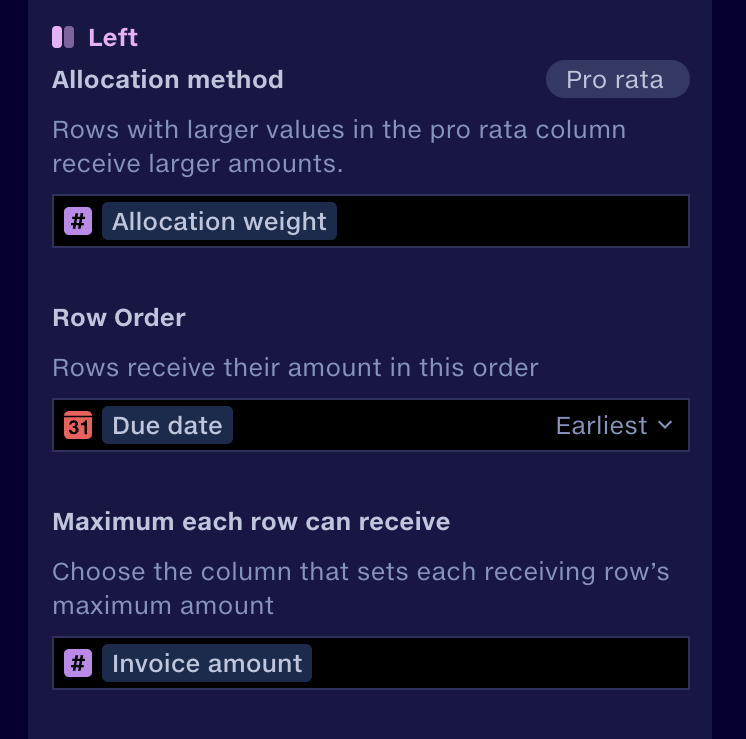
Allocation method
Choose how each group’s amount is divided between its matching Left rows.
In order
The whole amount goes to the first row in the Row Order. If rows have a maximum, the first row is filled up to its maximum, then the next row, and so on, until the amount runs out or every row is full.
Equally
The amount is divided equally between the matching rows. If a row would receive more than its maximum, it gets its maximum and the excess is divided equally between the rows that still have room. This continues until the amount runs out or every row is full, so rows with different maximums can end up with different amounts.
Pro rata
Pro rata means ‘in proportion’. Choose a numeric Left column to set each row’s proportion, often called its weight. Rows with larger values receive larger amounts: before any maximums apply, a row with a value of 2 receives twice as much as a row with a value of 1.
If a row reaches its maximum, it stops receiving. The rest is allocated between the other rows, still in proportion to their values.
A row with a weight of zero receives nothing under Pro rata, although the same row could receive an amount under Equally or In order. The pro rata column and the maximum column can be different columns.
Row Order
Choose a Left column, and which rows come first: Earliest or Latest for a date column, or Largest or Smallest for any other column. For example, Due date, Earliest puts the oldest invoices first. You can also choose Original row order to keep the order the rows have in the Left dataset.
- For In order, Row Order decides which rows are filled first.
- For Equally and Pro rata, it doesn’t change the proportions. It decides which row records the Surplus, and in the rounding example, which row receives the extra 0.01.
Row Order is separate from the reference column under Aggregate other columns. There, Payment date, Latest picks which Right row supplies the retained information. Here, Due date, Earliest picks which Left row comes first for allocation.
Row Order only affects allocation. The output rows can appear in a different order.
Maximum each row can receive
Choose a numeric Left column that sets the most each row can receive, such as Invoice amount, or choose No maximum.
- Each row’s maximum applies to that row only.
- When a row is full, the rest of the amount goes to the other rows, following the allocation method.
- When every row is full, anything left over is surplus.
- Maximums limit positive amounts only. See Refunds and negative amounts.
Compare the allocation methods
One allocation group has 180 to allocate. It matches three Left rows, shown in Row Order:
Row | Maximum | Pro rata value |
|---|---|---|
A | 30 | 3 |
B | 120 | 2 |
C | 180 | 1 |
Without maximums
Method | A | B | C |
|---|---|---|---|
In order | 180 | 0 | 0 |
Equally | 60 | 60 | 60 |
Pro rata | 90 | 60 | 30 |
With maximums
Method | A | B | C |
|---|---|---|---|
In order | 30 | 120 | 30 |
Equally | 30 | 75 | 75 |
Pro rata | 30 | 100 | 50 |
- In order: A is filled to 30 and B to 120. The remaining 30 goes to C.
- Equally: each row would get 60, but A can only take 30. Its extra 30 is divided between B and C, giving 75 each.
- Pro rata: A would get 90, but can only take 30. The remaining 150 is divided between B and C in their 2:1 proportion, giving 100 and 50.
In every case, all 180 is allocated. The maximums total 330, so the group is 150 short of filling them. Surplus is −150, recorded on row A.
Output
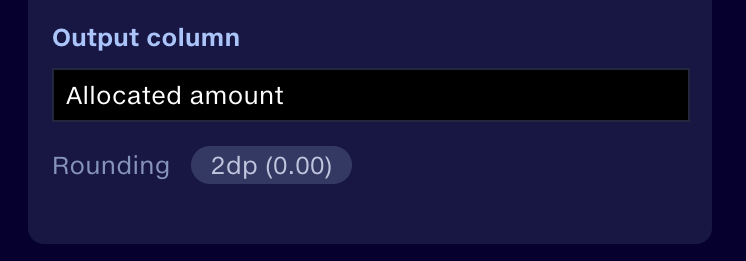
Allocated amount
The output column holds the amount allocated to each receiving row. You can give it any name.
Your Left columns stay as they are. The combined and retained Right columns appear alongside them, according to the Join’s output column settings. The combined Right amount is repeated on every matching row in the group. It’s the same group total each time, not extra money.
Surplus
The output also has a Surplus column. When rows have maximums, it compares the group’s amount with the total of the receiving rows’ maximums:
Surplus = amount available − total of the maximums
Surplus | Meaning | Example |
|---|---|---|
Positive | Amount left over after every row is full | 120 available, maximums total 50: Surplus 70 |
Negative | A deficit: how much more is needed to fill every row | 100 available, maximums total 300: Surplus −200 |
Zero | The amount exactly fills the maximums | 150 available, maximums total 150: Surplus 0 |
A negative Surplus doesn’t mean anything was left unallocated. All the money may have been allocated, with rows still below their maximum.
Surplus is a figure for the whole group, but it is recorded once, on the first receiving row in the Row Order. The group’s other rows show zero. With No maximum, the whole amount is allocated and Surplus is zero.
Refunds and negative amounts
Negative amounts, such as refunds, can be allocated too. They follow the allocation method, but maximums don’t limit them. For example, −60 across three rows:
Method | Row 1 | Row 2 | Row 3 |
|---|---|---|---|
In order | −60 | 0 | 0 |
Equally | −20 | −20 | −20 |
Pro rata, weights 1, 2, 3 | −10 | −20 | −30 |
These results are the same even if each row has a maximum of 10.
When a negative amount is fully allocated, Surplus is zero. It isn’t compared against the rows’ maximums, so it never shows a deficit. Reconciliation doesn’t reverse earlier allocations or find the original payment behind a refund. If you need the balance still owed, calculate it separately from your business data.
Rounding
Rounding sets how the allocated amounts are rounded:
- None – amounts are not rounded.
- Integer (0) – amounts are rounded to whole numbers.
- 2dp (0.00) – amounts are rounded to two decimal places.
For example, with 2dp, 100 divided equally across three rows gives:
Row | Allocated amount |
|---|---|
1 | 33.34 |
2 | 33.33 |
3 | 33.33 |
The total is still 100, and the first row in the Row Order receives the extra 0.01.
When a group has only one receiving row
If a group matches only one Left row, the whole amount goes to that row, subject to its maximum and the rules for negative amounts. So several Right rows, such as five payment instalments, can become one amount allocated to one invoice. Whether payments are allocated to one invoice or across several depends on the join points you choose.
Example: allocating payments to invoices
A client, C-100, has made three payments and has three open invoices. Payments should pay off the oldest invoices first, up to each invoice’s amount.
Right: payments
Client ref | Payment ID | Paid amount | Payment date |
|---|---|---|---|
C-100 | P-01 | 50 | 1 November 2026 |
C-100 | P-02 | 30 | 2 November 2026 |
C-100 | P-03 | 20 | 3 November 2026 |
Left: invoices
Client ref | Invoice | Due date | Invoice amount |
|---|---|---|---|
C-100 | INV-1 | 10 October 2026 | 40 |
C-100 | INV-2 | 20 October 2026 | 50 |
C-100 | INV-3 | 5 November 2026 | 60 |
Settings
- Join point: Client ref, so all of the client’s payments are pooled
- Allocation column: Paid amount, Sum
- Aggregate other columns: Payment date, Latest
- Allocation method: In order
- Row Order: Due date, Earliest
- Maximum each row can receive: Invoice amount
Output
Invoice | Invoice amount | Paid amount | Payment ID | Allocated amount | Surplus |
|---|---|---|---|---|---|
INV-1 | 40 | 100 | P-03 | 40 | −50 |
INV-2 | 50 | 100 | P-03 | 50 | 0 |
INV-3 | 60 | 100 | P-03 | 10 | 0 |
- The three payments are combined into 100.
- INV-1 and INV-2 are paid in full. The remaining 10 goes to INV-3.
- Paid amount shows the group total, 100, on every row. The total allocated is 40 + 50 + 10 = 100.
- Payment ID comes from P-03, the latest payment.
- The invoices total 150, so Surplus is −50: the payments fall 50 short of the invoice amounts. It is recorded once, on INV-1.
Troubleshooting
Symptom | What to check |
|---|---|
Too many rows, and no Allocated amount column | Check the Reconciliation switch is turned on, then run the pipeline again. |
Amounts go to the wrong end of the date order | Check Earliest or Latest under Row Order. |
An old balance or status is kept | Check the reference column and Latest under Aggregate other columns. |
Equal allocations aren’t equal | One or more rows may have reached their maximum. |
A row gets zero under Pro rata | Check whether its pro rata value is zero. |
Payment totals look too high | The combined Right amount repeats on every row in a group. Total the Allocated amount column instead. |
Results still reflect old settings | Run the pipeline again and download a fresh export. |
Surplus is negative although all payments were allocated | This is a deficit: the amount still needed to fill the rows’ maximums. |
A fully allocated refund shows zero Surplus | This is expected. Negative amounts don’t create a deficit. |
Quick reference
Setting | Purpose |
|---|---|
Reconciliation switch | Turns Reconciliation on for this Join. |
Join points | Decide which Right and Left rows form an allocation group. |
Allocation column | The Right amounts to allocate, and how they are combined: Sum, Mean, Max or Min. |
Aggregate other columns | Picks one Right row per group, by Earliest, Latest, Largest or Smallest, to supply the other Right values. |
Allocation method | How the amount is divided: In order, Equally or Pro rata. |
Pro rata column | The Left values that set each row’s proportion. |
Row Order | Which Left rows come first for allocation, rounding and Surplus: Earliest, Latest, Largest, Smallest or Original row order. |
Maximum each row can receive | The most each Left row can receive, or No maximum. |
Output column | Names the column holding each row’s allocated amount. |
Rounding | How allocated amounts are rounded: None, Integer (0) or 2dp (0.00). |
Surplus | Output column: amount left over, or short, against the maximums, once per group. |